

Reader, a new feature of Safari 5, removes visual distractions from Web pages. This is a boon for people with cognitive disabilities, indeed everyone distracted by advertisements, contextually-irrelevant images, etc..
How Reader Works
For any Web page Safari 5 recognizes as an article, a gray button labeled “Reader” appears to the right of the Web address at the top of the screen. (The button is indicated by a red arrow in the image below of a Wikipedia page.)


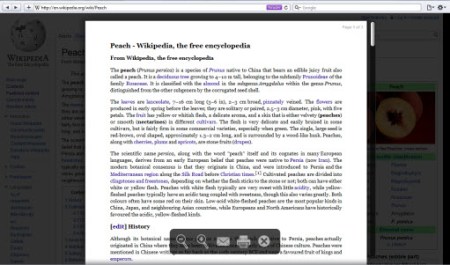
Clicking the button, which changes its color to purple, activates Reader. The following image shows the result: a view of only the page’s primary text.

Clicking the button again or pressing the “Esc” key deactivates Reader.
Features

- A toolbar appears near the bottom of the screen. It presents options to reduce- and enlarge text size, forward the article via e-mail, and print it.
- Safari 5 remembers the selected text size the next time the article is viewed.
- Every page of the article is displayed within Reader.
Problems
- Neither the toolbar nor the Reader button are keyboard accessible.
- The toolbar appears for just seconds, so using it means acting fast and with accuracy.
- Clicking a link to an external page, even if Safari 5 recognizes it as an article, displays it outside of Reader.
Thoughts
This is the first time such a readability tool has been built into a popular Web browser. I hope it is adopted by all the others. For now, equivalent tools can be added to browsers via plug-ins. Three I have reviewed are listed below.
I also hope these readability tools show Web designers how difficult the reading experience can be. Large- or animated advertisements and other distractions can drive people from Web sites. Simple page layouts designed for readability can have the opposite effect. An example of this is Craig’s List.
Other Readability Tools
Free Readability Tool for iPhone & Desktop Web Browsers
Readable Tool Better Than One David Pogue Says Is Best Tech Idea Of 09
Readability: Free Tool Strips All Distractions From Web Pages
Note: The version of Safari referenced above is 5.0 (7533.16). No endorsement of it is intended or implied.